
What Are The Common Misconceptions in Video Conferences?
Six beliefs about video conferencing that lead teams to spend badly and blame the wrong things.
- "Expensive equipment always performs better." False. Fit to your room matters more than price
- "More than five participants kills productivity." False. Facilitation decides productivity, not headcount
- "Video quality matters more than audio." False. Audio failures end engagement faster than soft video
- "Zoom, Teams and Meet perform very differently." False. Equipment and network account for most of the difference
- "Laptop webcams are fine for small groups." False. They degrade sharply past about six feet
- "Remote participants cannot contribute equally." False. Equipment and facilitation close most of the gap
When evaluating which of the following is true about video conferences, many professionals believe myths that actively harm their meeting effectiveness: that expensive equipment always performs better, that more participants automatically reduce productivity, that video quality matters more than audio, or that platform choice significantly impacts collaboration quality. The truth about video conferences is often counterintuitive—affordable professional equipment like the Coolpo AI Pana ($598.98) outperforms expensive consumer setups, well-facilitated large meetings can be highly productive, audio quality impacts engagement far more than video resolution, and platform differences matter less than proper equipment and meeting structure.
Why These Misconceptions Cost Money
Meetings are already the most complained-about part of knowledge work, and video conferencing inherits all of it.
Atlassian surveyed 5,000 knowledge workers across four continents and found meetings are considered ineffective 72% of the time. Nearly four in five respondents said the volume of meetings makes it hard to get their actual work done, and 76% reported feeling drained on days heavy with meetings.
What stands out in that data is where the failures come from. Respondents pointed at meetings with no stated goal, no agenda, no clear next steps, and a handful of voices dominating the conversation. Those are structural problems. None of them is fixed by a better camera, and none of them is caused by the platform.
That cuts both ways, and it is the thread running through everything below. Some meeting problems are structural and no amount of hardware will solve them. Others are genuinely equipment problems that teams keep trying to solve with policy. Telling the two apart is most of the skill.
The wider set of [hybrid workplace technology trends has made this harder, not easier, by putting more purchasing options in front of teams than any single room needs.
6 Common Misconceptions About Video Conferences

Misconception 1: More Expensive Equipment Is Always Better
The myth: a $2,000 to $5,000 conference room system delivers proportionally better results than a $600 to $800 one.
What is actually true: equipment effectiveness depends on room shape and use case, not price. A system built for the wrong scenario underperforms a cheaper one built for yours.
Why the myth persists
Enterprise sales lead with feature lists rather than meeting needs, and more features feel safer than the right features. Price becomes a proxy for quality when nobody has defined what quality means for their specific room.
The truth about equipment value
Consider a common mismatch. A $2,500 directional PTZ camera with a 120° field of view sits at one end of the room and frames it from there. Anyone at the table edges falls outside the frame. No amount of resolution fixes a coverage problem, because the people who are missing are not blurry, they are absent.
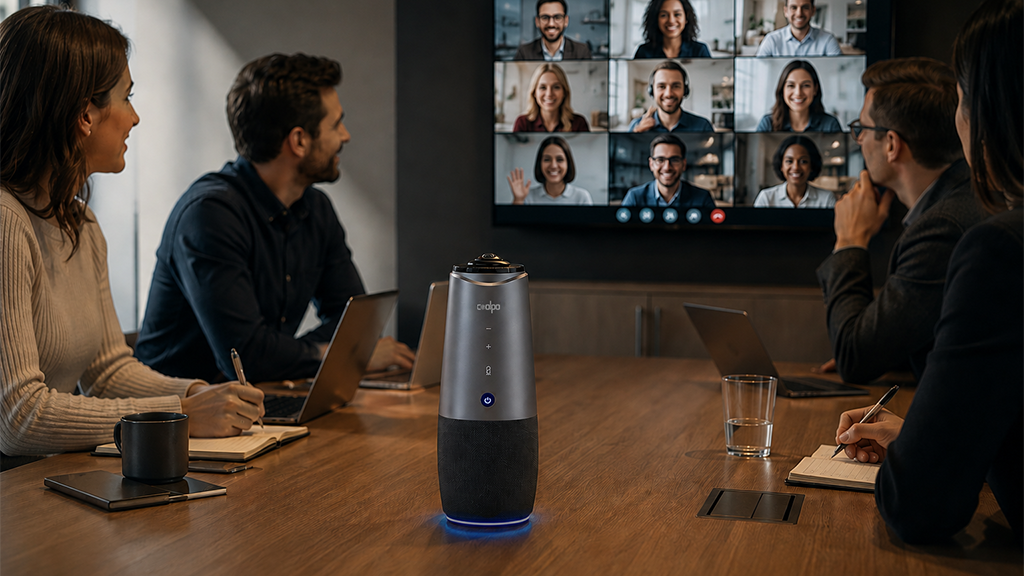
A 360° tabletop camera solves that specific failure for a fraction of the price. The Coolpo AI Huddle PANA at $598.98 sits at table center and captures every seat equally, with an 8-microphone array and a 15-foot pickup range built into the same device.
The integration matters as much as the price. Expensive room systems typically require separate microphones, speakers, and audio processing, each one a purchase, an installation, and a thing that can fail. A single USB device that handles both video and audio removes the installation entirely and reduces the number of components that can break to one.
Many premium systems also carry platform licensing, tying you to Zoom Rooms or Teams Rooms with an annual per-room cost. A standard USB device carries none of that and works with whatever platform a given meeting happens to use.
Smart approach
Match the equipment to the room, not to the budget tier. For round-table collaborative meetings with three to fifteen people, 360° coverage and integrated audio beat expensive directional systems designed for theater-style seating. Buy the core setup, use it for a month, and let real complaints drive the next purchase.
For a fuller breakdown of what earns its place in a meeting room, see our guide to conference room gadgets worth the investment.
Misconception 2: Meetings With More Than Five People Are Automatically Unproductive
The myth: large video conferences inevitably collapse into chaos.
What is actually true: structure determines productivity, not headcount. A well-run fifteen-person meeting outperforms a badly run four-person one.
Why the myth persists
Almost everyone has sat through a terrible large video call. It is natural to blame the most visible variable, which is the number of faces on screen. The less visible variables, no agenda and no facilitator, are the ones doing the damage.
The truth
The Atlassian findings point directly at this. The complaints that came up were meetings without a stated goal, meetings without an agenda, meetings that end without clear next steps, and a few voices dominating. Every one of those gets worse as a group grows, but none of them is caused by the group being large. Add structure and a fifteen-person meeting works. Remove structure and a four-person meeting still fails.
Group size does change what structure you need. Six people can self-organize. Fifteen cannot, and will need someone explicitly managing speaking order.
Smart approach
- Distribute an agenda before the meeting, not during it
- Name a facilitator who manages speaking order
- Use equipment that captures every participant equally, so remote attendees can tell who is speaking
- Define how the decision gets made before the discussion starts
- Document action items with named owners
Misconception 3: Video Quality Matters More Than Audio Quality
The myth: invest in a 4K camera and accept whatever audio comes with it.
What is actually true: audio failures end engagement far faster than video ones. People tolerate a soft image almost indefinitely. They cannot tolerate not hearing.
Why the myth persists
Video problems announce themselves. Pixelation and freezing are obvious and everyone comments. Audio problems are subtle until they are severe, so they get normalized. Marketing also emphasizes resolution, because a number like 4K is easier to sell than a microphone array specification.
Why audio actually matters more
The reason is how comprehension works, not a statistic.
Speech processing is automatic. When audio is clean, your brain decodes words without conscious effort, leaving your full attention for the content. When audio is degraded, that decoding becomes conscious work. You are reconstructing missing words from context, several times a minute, for the length of the meeting. That effort competes directly with actually thinking about what is being said.
Degraded video costs nothing comparable. A slightly soft image still conveys who is talking, whether they are engaged, and roughly what their expression is. You lose nuance. You do not lose the content.
This is why a meeting with 720p video and clear audio works, and a meeting with 4K video and a distant, echoing microphone does not.
Smart approach
Set the audio requirement first, then choose a camera that meets it.
- Microphone pickup range that reaches your furthest seat, typically 10 to 20 feet
- Beamforming that isolates voices from room noise
- Echo cancellation to prevent feedback
- Noise suppression for HVAC and keyboards
- Integrated speakers so remote voices are audible across the room
A camera with professional audio built in, or a dedicated unit like the Coolpo IGNITE Speakerphone for rooms that already have a camera, covers this without a separate audio chain.
Misconception 4: Zoom, Teams and Meet Perform Significantly Differently
The myth: platform choice fundamentally determines meeting quality.
What is actually true: with equivalent equipment and network conditions, the major platforms deliver broadly similar core experiences. Your camera, your microphone and your bandwidth account for far more of the difference than the logo on the window.
Why the myth persists
Each platform has distinctive features, and it is easy to generalize from a feature difference to a quality difference. Early reliability problems during the 2020 to 2021 period also left durable impressions that no longer describe the current products.
The truth
For core video conferencing, the major platforms now overlap heavily. All support HD and 4K video, screen sharing, recording, breakout rooms, transcription and summaries, and all work with standard USB cameras and microphones.
Where they genuinely differ is ecosystem fit and specific feature depth, not raw call quality. If your call looks or sounds bad on one platform and fine on another, the usual explanation is bandwidth at the time, or a device permission set differently, rather than the platform itself.
Smart approach
Choose on ecosystem, then make the equipment platform-agnostic.
- Microsoft 365 organization, use Teams for calendar, file and chat integration
- Google Workspace organization, use Meet for Gmail, Drive and Calendar integration
- Frequent external or cross-organization meetings, Zoom tends to have the widest guest compatibility
Then buy equipment that connects over standard USB and works with all of them. That avoids the situation where a platform decision three years from now is constrained by hardware bought today.
If quality varies between platforms on the same hardware, how to improve video quality on Google Meet or Zoom covers the settings that usually explain it.
Misconception 5: Laptop Webcams Are Fine for Small Group Meetings
The myth: with only three to five people in the room, the laptop webcam is good enough.
What is actually true: laptop webcams are built for one person at arm's length. They degrade sharply the moment a second person sits down.
Why the myth persists
Laptop webcams genuinely work well for one-on-one calls, which creates the assumption that they scale. And because the degraded group experience is now so common, it reads as normal rather than as a fixable problem.
The truth
A laptop webcam and microphone are optimized for a person sitting 18 to 24 inches away, centered. Three things break at conference table distance.
Framing - Field of view on a typical laptop camera runs roughly 60 to 78 degrees. That covers one or two people directly in front. Anyone at the table edges is outside the frame entirely, which produces the forgotten-participant problem: remote attendees hear a voice with no face attached to it.
Facial detail - At two feet, expressions read clearly. At six feet, the subtleties that carry agreement, confusion and hesitation are largely gone. At ten feet and beyond, remote participants often cannot tell who is speaking.
Audio pickup - This fails fastest. A laptop microphone tuned for 18 inches picks up a voice from six feet as distant and thin, and from ten feet as muffled. Worse, it picks up room noise at full strength, so background sound competes with speech rather than sitting behind it.
Smart approach
Three or more people in the room is the threshold where a dedicated conference camera pays for itself. Look for:
- Wide or 360° coverage that reaches every seat
- A microphone array rated for 10 to 20 feet
- Speaker tracking, useful once groups get past six or seven
- A display large enough that remote participants appear at human scale
The entry point for this is around $600, which is low relative to the cost of every hybrid meeting in that room working badly.
Misconception 6: Remote Participants Cannot Contribute as Effectively as In-Room Attendees
The myth: in-room attendees inevitably dominate hybrid meetings, so remote participation is second-class by nature.
What is actually true: most of that gap is created by equipment and facilitation, both of which are fixable. Very little of it is inherent to being remote.
Why the myth persists
Most organizations run hybrid meetings on a laptop webcam and whatever audio came with it. Under those conditions remote participants genuinely cannot participate well. The failure is real, so the conclusion feels earned. It just gets attributed to remote work rather than to the setup.
The truth
Break down what a remote participant actually needs, and almost all of it is purchasable.
They need to see everyone. Not the person nearest the laptop. Everyone. That requires coverage of the whole table, which is a camera specification.
They need to hear everyone equally. Including the person at the far end who speaks quietly. That is a microphone range and beamforming specification.
They need to be seen and heard in return. A display large enough that they appear at human scale, positioned near the camera so eye contact reads naturally, plus room speakers that carry their voice to every seat.
What remains after all of that is a facilitation problem, and it is a real one. In-room participants can interrupt more easily, read the room, and catch side conversations. Remote attendees cannot. That gap closes with deliberate practice rather than with hardware.
Facilitation practices that close the rest
- Invite remote participants into the discussion explicitly rather than waiting for them to interject
- Check for raised hands and chat messages before moving to the next agenda item
- Rotate who speaks first, so it is not always someone in the room
- Share materials in advance, which levels information access
- Work in documents everyone can edit rather than on a screen only the room can see
- Give remote participants active roles such as note-taker or timekeeper
Smart approach
Fix the equipment first, because facilitation cannot compensate for a remote attendee who genuinely cannot hear. Then train facilitators, because equipment cannot compensate for a meeting where nobody asks the remote people what they think.
Conclusion
Work out which kind of problem you have before spending anything.
If your meetings run long, end without decisions, or get dominated by two people, that is structural. New hardware will not touch it. Start with agendas, a named facilitator, and written action items, all of which are free.
If remote attendees regularly ask people to repeat themselves, cannot tell who is speaking, or drop out of the conversation entirely, that is equipment. No amount of facilitation fixes a microphone that cannot reach the end of the table.
Most teams have both, and treat only one. The tell is simple: if the same meeting works fine when everyone is in the room and falls apart when two people dial in, it is equipment. If it fails in both formats, it is structure.
Better meetings start with better gear
See how Coolpo AI Huddle PANA keeps remote and in-room teams perfectly clear.
1. Does expensive video conferencing equipment always perform better?
No. Effectiveness depends on matching equipment to your room and meeting style. A 360° tabletop camera designed for round-table meetings will outperform a more expensive directional system built for theater-style seating, because coverage is the thing that fails first in a collaborative room. Price is a poor proxy for fit.
2. Are video conferences with more than five or six people unproductive?
Not inherently. Structure determines productivity. Meetings with a clear agenda, a designated facilitator, defined decision-making and documented action items stay productive well past fifteen participants. Larger groups need more structure, not fewer people.
3. Which matters more, video resolution or audio quality?
Audio, clearly. Degraded audio forces continuous conscious effort to reconstruct words, which competes with actually following the discussion. Degraded video costs you nuance but not content. If budget forces a choice, spend it on microphone quality and pickup range before camera resolution.
4. Do Zoom, Teams and Google Meet perform significantly differently?
Not for core video conferencing. With equivalent equipment and network conditions the major platforms deliver broadly similar call quality. They differ meaningfully in ecosystem integration and specific features. Choose on which productivity suite you already use, then buy USB equipment that works with all of them.
5. Can remote participants contribute as effectively as people in the room?
Largely yes, once the setup supports it. Remote attendees need to see every person in the room, hear every voice clearly, and appear at human scale on a display positioned near the camera. Meet those conditions and the remaining gap is facilitation, which is addressed by explicitly inviting remote input and rotating who speaks first.
Recent blogs


.jpg)

Reliable
Innovation
Touch


