
Productivity Solutions for Small Business Sales Meetings
Small business sales meetings lose productivity more often from disconnected tools and workflow gaps than from the sales process itself. The right stack combines a reliable video conferencing platform, professional audio and video setup, scheduling automation, a centralized CRM, AI meeting assistants, cloud file sharing, and clean presentation tools. Together, these reduce friction, cut missed follow-ups, and make client meetings feel more professional.
Sales meetings are where small businesses win or lose client trust, and the tools running those meetings matter as much as the pitch itself. The best productivity solutions for small business sales meetings in 2026 focus on improving communication, presentation quality, scheduling, collaboration, and follow-up workflows. Small businesses now rely on connected tools and meeting systems to run more professional client discussions, reduce delays, and improve overall sales efficiency.
Why Sales Meeting Productivity Matters for Small Businesses
Sales meetings often shape client impressions, decision-making, and business growth. However, many small businesses struggle with:
- Poor audio or video quality during calls
- Disorganized presentations and follow-ups
- Scheduling delays and meeting conflicts
- Weak collaboration between sales teams
- Communication gaps during hybrid meetings
In many cases, productivity problems during sales meetings are caused more by workflow and communication issues than by the sales process itself.
Best Productivity Solutions for Small Business Sales Meetings
Below, we break down the most effective productivity solutions that help small businesses run smoother and more productive sales meetings.
1. Reliable Video Conferencing Platforms
Stable communication is the foundation of productive sales meetings.
Popular platforms:
- Zoom
- Microsoft Teams
- Google Meet
These platforms support virtual presentations, client discussions, and hybrid collaboration. Strong meeting reliability helps reduce interruptions and improves professionalism during client interactions.
2. Professional Audio and Video Setup
Meeting quality directly affects how professional a business appears.
Important setup features:
- Clear microphones and noise reduction
- Stable camera positioning
- Proper lighting setup
- Wide room visibility for team meetings
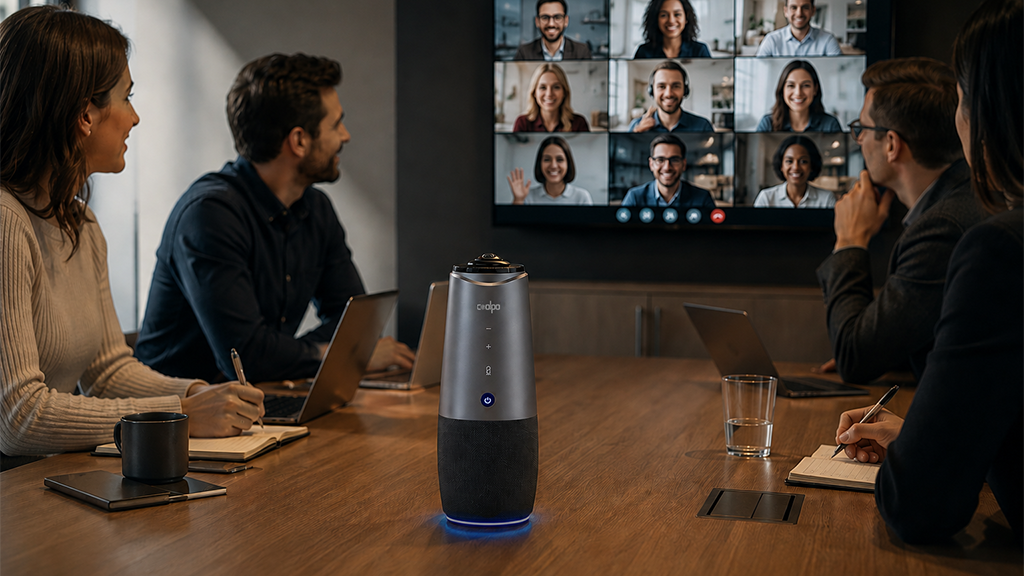
For hybrid sales discussions and conference rooms, solutions like Coolpo AI Huddle PANA help improve meeting visibility and communication by combining 360° video, microphones, speakers, and AI speaker tracking into one system.
This allows both clients and internal teams to communicate more naturally without managing multiple devices or complicated setups.
3. Scheduling and Calendar Coordination Tools
Scheduling delays can slow down sales opportunities.
Popular tools:
- Calendly
- Google Calendar
- Microsoft Outlook
- Motion AI Scheduler
These systems simplify appointment booking, meeting coordination, and availability management. Automated scheduling also reduces back-and-forth communication with clients.
4. CRM and Sales Workflow Systems
Sales productivity improves when customer information and follow-ups are centralized.
Popular platforms:
- HubSpot
- Salesforce
- Pipedrive
- Zoho CRM
CRM systems help businesses track leads, meeting notes, proposals, and follow-ups in one place. This improves visibility and reduces missed opportunities.
5. AI-Powered Meeting and Productivity Tools
AI tools are increasingly used to reduce manual work during meetings.
Common use cases:
- AI meeting summaries
- Automated note-taking
- Action item generation
- Email drafting and follow-up support
These tools help sales teams focus more on conversations and client engagement instead of manual administrative tasks. Reliable audio makes these tools more accurate too. Clean, noise-free input is what separates an AI summary that gets the details right from one that misses them, a challenge [sales teams handling cold-calling volume know well -> /post/how-sales-agents-build-stronger-client-connections-with-a-headset-for-cold-calling].
6. Cloud-Based Collaboration and File Sharing
Sales teams often need fast access to presentations, proposals, and documents.
Popular platforms:
- Google Drive
- OneDrive
- Dropbox
- Notion
Cloud-based systems make it easier to share files, update materials, and collaborate across teams in real time.
7. Presentation and Screen Sharing Tools
Professional presentations improve client engagement and meeting clarity.
Useful tools:
- Canva
- PowerPoint
- Google Slides
- Figma (for collaborative presentations)
Clear visuals and organized presentations help small businesses communicate ideas more effectively during sales discussions.
Practical Setup for Small Business Sales Meetings
A modern small business sales meeting setup often includes:
- Video conferencing platform → Zoom or Teams
- CRM system → HubSpot or Salesforce
- Scheduling tool → Calendly
- Shared file system → Google Drive or OneDrive
- AI meeting assistant → automated summaries and notes
- Conference room system → Coolpo PANA or similar hybrid meeting solution
The goal is not simply adding more software. It's building a workflow that reduces friction and improves communication throughout the sales process. A well-organized meeting stack pairs naturally with the same all-hands and internal meeting habits that keep bigger teams aligned.
Common Productivity Problems in Sales Meetings
- Poor audio and video quality
- Delayed follow-ups
- Disconnected communication tools
- Scheduling conflicts
- Weak hybrid meeting experience
- Lack of centralized meeting notes
Small businesses often lose productivity because systems are disconnected, not because teams lack effort. Fixing this rarely means buying more software. Often it means [auditing which remote work tools are actually pulling their weight -> /post/what-are-the-best-tools-for-effective-remote-work-and-telecommuting] and cutting the ones that just add friction.
Conclusion
The best productivity solutions for small business sales meetings focus on improving communication, collaboration, scheduling, and presentation quality. By combining reliable meeting platforms, structured workflows, and professional conferencing setups, small businesses can create smoother client experiences and improve overall sales efficiency.
Better meetings start with better gear. Explore how the Coolpo Ignite headset and Coolpo AI Huddle PANA keep remote and in-room sales teams perfectly clear.
1. What is the most important productivity solution for small business sales meetings?
A reliable video conferencing platform and professional audio and video setup come first. Weak call quality undermines every other tool in the stack, since scheduling and CRM systems only matter once the meeting itself runs smoothly.
2. Do small businesses really need a CRM for sales meetings?
Yes, even a lightweight CRM like Pipedrive or HubSpot's free tier prevents missed follow-ups and keeps meeting notes centralized, which is often where small teams lose the most deals.
3. Can AI meeting tools replace manual note-taking for small business sales calls?
Largely, yes. AI meeting summaries and automated note-taking free up sales reps to focus on the conversation instead of typing, though accuracy depends heavily on clear audio input during the call.
4. What causes the most productivity loss in small business sales meetings?
Disconnected tools, not lack of effort. Scattered scheduling, files, and notes across separate apps create more friction than any single weak tool would on its own.
5. Is a dedicated conference room camera worth it for a small business?
For hybrid or in-person client meetings, yes. A single system like Coolpo AI Huddle PANA that combines camera, microphones, and speaker tracking removes the need to manage multiple devices and reduces setup errors before client calls.
Recent blogs
.jpg)



%20(3).jpg)
Reliable
Innovation
Touch


